Data Wrangling

Author
Affiliation

Biometrics Unit

International Institute of Tropical Agriculture (IITA)

Introduction

Data wrangling is the process of transforming raw data into a more organized and structured format, which facilitates improved insights and better decision-making. Imagine your data as a set of puzzle you need to solve, data wrangling is a tool that will significantly help you to organise the data, making it much easier to solve the data puzzles.

There are six stages involved in data wrangling, they are highlighted below:

  1. Data Discovery: Data discovery is the process of uncovering and exploring valuable insights within data. This usually involves collecting data from different sources, transforming and merging it, and employing visualization and analytical methods to reveal patterns, trends, and insights. The aim is to make data more accessible and actionable for decision-making, enabling users to grasp complex information and address specific business questions.

    Data discovery is the process that enables users to visually explore data and apply advanced analytics to uncover patterns, gain insights, answer specific questions, and extract value from business information. It involves integrating and transforming data from multiple sources, analyzing data structures, and using visualization techniques to gain insights and extract valuable information.

  2. Data Structuring: Data structures are specialized formats for organizing data on a computer to ensure efficient processing, storage, and retrieval. They provide a systematic way to manage information, making it easier to access and use. A data structure is a method for organizing and managing data. It helps in gathering different types of data, whether structured or unstructured, and transforming it into useful and meaningful information. An array is an example of data structure.

  3. Data Cleaning: Data cleaning is a vital stage in the data science workflow, focusing on detecting and rectifying errors, inconsistencies, and inaccuracies in the data to enhance its quality and usability. This process is crucial because raw data often contains noise, gaps, and inconsistencies that can adversely affect the accuracy and dependability of the insights generated from it. Data cleaning involves preparing data for analysis by correcting or eliminating data that is incorrect, incomplete, irrelevant, duplicated, or poorly formatted. It involves steps such as removing unwanted observations, managing structure errors, managing unwanted outliers and handling missing data.

  4. Data Enriching: After transforming your data into a more usable format, evaluate whether you have all the necessary information for your analysis. If not, you can enhance it by incorporating values from additional datasets. This is also a good time to consider adding metadata to your database.

  5. Data validation: Once you’ve converted your data into a more usable format, assess if you have all the information required for your analysis. If anything is missing, you can augment it by integrating data from other sources. Additionally, this is an opportune moment to add metadata to your database. Validation guarantees the quality and reliability of your processed data. It involves checking for inconsistencies, verifying data integrity, and ensuring the data meets predefined standards. This process helps build confidence in the dataset’s accuracy and ensures it is suitable for meaningful analysis.

  6. Data Publishing: Data publishing refers to the process of making data available to users, often by sharing or disseminating it through various platforms or channels. This can involve publishing datasets on websites, data repositories, or databases, ensuring that the data is accessible, usable, and properly documented for others to analyze or utilize.

    Also, there are three main aspect of data wrangling. These includes:

    1. Tibbles
    2. Data import
    3. Tidy data

Tibbles

Tibbles are a key feature of the tidyverse, distinguishing it from most other R packages, which typically use standard data frames. You can convert a dataset to tibbles with as_tibble()

Example

library(tidyverse) #load tidyverse package 
── Attaching core tidyverse packages ──────────────────────── tidyverse 2.0.0 ──
✔ dplyr     1.1.4     ✔ readr     2.1.5
✔ forcats   1.0.0     ✔ stringr   1.5.1
✔ ggplot2   3.5.1     ✔ tibble    3.2.1
✔ lubridate 1.9.3     ✔ tidyr     1.3.1
✔ purrr     1.0.2     
── Conflicts ────────────────────────────────────────── tidyverse_conflicts() ──
✖ dplyr::filter() masks stats::filter()
✖ dplyr::lag()    masks stats::lag()
ℹ Use the conflicted package (<http://conflicted.r-lib.org/>) to force all conflicts to become errors
library(agridat)  #load agridat package 
dat <- (australia.soybean) 
dat <-  as_tibble(dat)  #convert dataframe to tibble dat 

You can create tibbles from raw data using tibble() as shown below

Example

tibble (   x = 1:10,   y = rep(1:5,2),   z = x + y )
# A tibble: 10 × 3
       x     y     z
   <int> <int> <int>
 1     1     1     2
 2     2     2     4
 3     3     3     6
 4     4     4     8
 5     5     5    10
 6     6     1     7
 7     7     2     9
 8     8     3    11
 9     9     4    13
10    10     5    15

What are the common differences between a tibble and a dataframe

A tibble is considered a neater format of a data frame and its often used in tidyverse and ggplot2 packages. Tibble has an advanced print function and only shows the first ten rows with all the columns fitted on the screen. The data type is written just below the heading of each column. This does not apply to data frame. Tibble can be used for indexing such as $, [[ ]]. $ extracts using name while [[ ]] extract by name and position.

Example

set.seed(234) 
df <- tibble(   x = runif(5),   y = rnorm(5) )  # Extract by name df$x  
df[["x"]]  # Extract by position df[[1]] 
[1] 0.74562000 0.78171242 0.02003711 0.77608539 0.06691009

Data Import

Importing a Comma Seperated Version (CSV)

Data import can be done with the readr package which is a core tidyverse package. This is used for reading data stored in text file spreadsheets into R. Some readr’s function are used in turning flat files into dataframe. You can load readr using the code library(readr), this gives you access to functions such as: read_csv() for reading comma delimited files, read_csv2() for semicolon separated files, read_table for white space separated values etc.

#install readr package 
install.packages("readr")  # load the package 
Warning: package 'readr' is in use and will not be installed
library(readr)  #read the csv file into a tibble  
data <- read_csv("steptoe.morex.pheno.csv") 
Rows: 2432 Columns: 10
── Column specification ────────────────────────────────────────────────────────
Delimiter: ","
chr (2): gen, env
dbl (8): amylase, diapow, hddate, lodging, malt, height, protein, yield

ℹ Use `spec()` to retrieve the full column specification for this data.
ℹ Specify the column types or set `show_col_types = FALSE` to quiet this message.
data
# A tibble: 2,432 × 10
   gen     env   amylase diapow hddate lodging  malt height protein yield
   <chr>   <chr>   <dbl>  <dbl>  <dbl>   <dbl> <dbl>  <dbl>   <dbl> <dbl>
 1 Steptoe MN92     22.7     46   150.      NA  73.6   84.5    10.5  5.53
 2 Steptoe MTi92    30.1     72   178       10  76.5   NA      11.2  8.64
 3 Steptoe MTd92    26.7     78   165       15  74.5   75.5    13.4  5.90
 4 Steptoe ID91     26.2     74   179       NA  74.1  111      12.1  8.63
 5 Steptoe OR91     19.6     62   191       NA  71.5   90      11.7  5.34
 6 Steptoe WA91     23.6     54   181       NA  73.8  112      10    6.27
 7 Steptoe MTi91    21       62   181       NA  70.8   98      12    4.10
 8 Steptoe MTd91    NA       NA   181       NA  NA     82      NA    7.07
 9 Steptoe NY92     NA       NA   176        0  NA     77.5    NA    6.05
10 Steptoe ON92     NA       NA   198       50  NA     95      NA    3.70
# ℹ 2,422 more rows

Importing an Excel Version (XLSL)

The readxl library can also be assessed from the readr package and it is used to import excel files. The functions to import excel files are read_excel() or read_xlsx(). The read_excel() auto detect the format while read_xlsl()permits more than two sheets in a file.

Example

#install the readxl package 
#install.packages("readxl")   #load the readxl package 
library(readxl)  #Read the Excel file into a tibble 
dat <-  read_excel("Sugar cane.xlsx", sheet = "Sugar cane") 
dat 
# A tibble: 30 × 6
   Choice Stalks Height Diameter  Cane Variety
    <dbl>  <dbl>  <dbl>    <dbl> <dbl>   <dbl>
 1      1     23   2.37     1.7  12.4        2
 2      0     11   2.25     1.68  5.49       3
 3      0      9   2.5      1.93  6.59       2
 4      1     25   2.4      2.12 21.2        2
 5      1     20   2.5      1.7  11.4        1
 6      0     12   1.9      1.51  4.08       1
 7      0     12   1.7      1.34  2.88       3
 8      1     16   2.4      1.84 10.2        1
 9      0      4   2.4      2.11  3.36       3
10      1     11   2.35     2     8.12       1
# ℹ 20 more rows

Tidy Data

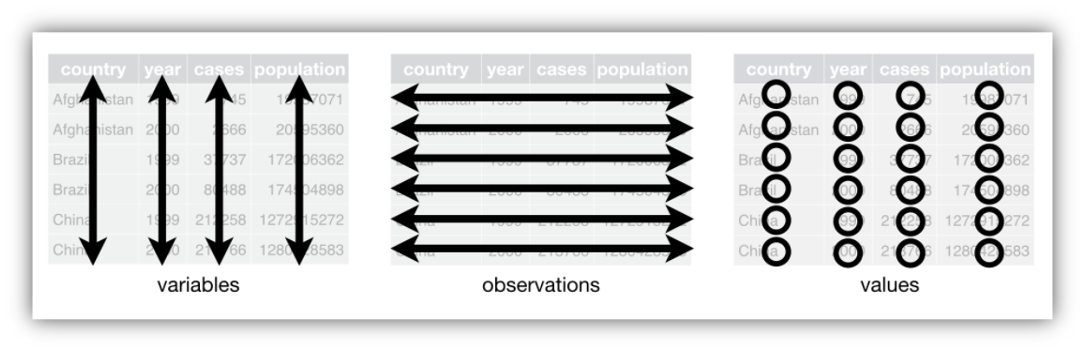
Tidy data considers ways to convert your messy dataset into format that are clean and can be easily analysed. The aim of tidyr is to assist in creating tidy data, where:

  • Each variable is represented as a column, and each column corresponds to a variable.
  • Each observation is represented as a row, and each row corresponds to an observation.
  • Each value is contained within a cell, with each cell holding a single value.

The principles of tidy data offer a standardized method for organizing data values within a dataset. The tidy data standard is designed to ease the initial exploration and analysis of data and to streamline the creation of data analysis tools that integrate seamlessly.

Various functions can be used in the tidyr package, functions such as pivoting (longer and wider), rectangling, nesting, splitting, replace and drop na etc.

Examples

Data Frame

Let’s create a data frame

trial01 <- data.frame(   variety = c("G01-US234", "G05-BT456", "Ind01","G11-DR234", "Check"),    yield = c(6323.3, 2515.2, 5611, 7729, 7843.25),   height = c(123.30, 95.2, 113, 89.45, 145.67)   )

Let’s display the data frame

trial01  ## display the object in Q2
    variety   yield height
1 G01-US234 6323.30 123.30
2 G05-BT456 2515.20  95.20
3     Ind01 5611.00 113.00
4 G11-DR234 7729.00  89.45
5     Check 7843.25 145.67
View(trial01) ## display the object in Q1 
#trial01[R,C] 
trial01[1:5,]
    variety   yield height
1 G01-US234 6323.30 123.30
2 G05-BT456 2515.20  95.20
3     Ind01 5611.00 113.00
4 G11-DR234 7729.00  89.45
5     Check 7843.25 145.67

We can extract the first three rows:

# object[1:nrows, 1:ncolumns] 
trial01[1:5, 1:3] 
    variety   yield height
1 G01-US234 6323.30 123.30
2 G05-BT456 2515.20  95.20
3     Ind01 5611.00 113.00
4 G11-DR234 7729.00  89.45
5     Check 7843.25 145.67
trial01[1:3, ] # the three first rows and all columns
    variety  yield height
1 G01-US234 6323.3  123.3
2 G05-BT456 2515.2   95.2
3     Ind01 5611.0  113.0
# We can extract the first two columns 
trial01[, 1:2] 
    variety   yield
1 G01-US234 6323.30
2 G05-BT456 2515.20
3     Ind01 5611.00
4 G11-DR234 7729.00
5     Check 7843.25
# We can extract "from 3rd to 5th row" with "2nd and 3rd column" 
trial01[3:5, 2:3]  
    yield height
3 5611.00 113.00
4 7729.00  89.45
5 7843.25 145.67
trial01[,c(1,3)]
    variety height
1 G01-US234 123.30
2 G05-BT456  95.20
3     Ind01 113.00
4 G11-DR234  89.45
5     Check 145.67
# We can list the column names using any of this methods
names(trial01) 
[1] "variety" "yield"   "height" 
colnames(trial01)
[1] "variety" "yield"   "height" 
# We can extract specific column from a data frame using column name 
trial01$  yield1 <- trial01$yield  
trial01$yield  
[1] 6323.30 2515.20 5611.00 7729.00 7843.25
# trial01$Yield. R is case sensitive, yield is different from Yield  # We can find the mean of the extracted column using any of the codes below  
mean(trial01$yield) 
[1] 6004.35
mean(trial01$yield) 
[1] 6004.35
# We can add a column vector using a new column name 
trial01$flowering <- c(87, 101, 88, 120, 90) 
trial01$flowering <- c(87,101,88,120,90) 
trial01 
    variety   yield height  yield1 flowering
1 G01-US234 6323.30 123.30 6323.30        87
2 G05-BT456 2515.20  95.20 2515.20       101
3     Ind01 5611.00 113.00 5611.00        88
4 G11-DR234 7729.00  89.45 7729.00       120
5     Check 7843.25 145.67 7843.25        90
flowering2 <- c(87,101,88,120,90)  
trial01$flowerin2 <- flowering2  
trial01
    variety   yield height  yield1 flowering flowerin2
1 G01-US234 6323.30 123.30 6323.30        87        87
2 G05-BT456 2515.20  95.20 2515.20       101       101
3     Ind01 5611.00 113.00 5611.00        88        88
4 G11-DR234 7729.00  89.45 7729.00       120       120
5     Check 7843.25 145.67 7843.25        90        90

The tidyverse package

library(tidyverse) 
trial01  # Let's look at the structure of trial01  
    variety   yield height  yield1 flowering flowerin2
1 G01-US234 6323.30 123.30 6323.30        87        87
2 G05-BT456 2515.20  95.20 2515.20       101       101
3     Ind01 5611.00 113.00 5611.00        88        88
4 G11-DR234 7729.00  89.45 7729.00       120       120
5     Check 7843.25 145.67 7843.25        90        90
str(trial01) ## structure of trial01: what's trial01?
'data.frame':   5 obs. of  6 variables:
 $ variety  : chr  "G01-US234" "G05-BT456" "Ind01" "G11-DR234" ...
 $ yield    : num  6323 2515 5611 7729 7843
 $ height   : num  123.3 95.2 113 89.5 145.7
 $ yield1   : num  6323 2515 5611 7729 7843
 $ flowering: num  87 101 88 120 90
 $ flowerin2: num  87 101 88 120 90
# we can convert trial01 to a tibble and save the new created object into trial01.tibble 
trial01.new <- as_tibble(trial01)  
trial01.new # dbl(double) and int(integer) are numeric
# A tibble: 5 × 6
  variety   yield height yield1 flowering flowerin2
  <chr>     <dbl>  <dbl>  <dbl>     <dbl>     <dbl>
1 G01-US234 6323.  123.   6323.        87        87
2 G05-BT456 2515.   95.2  2515.       101       101
3 Ind01     5611   113    5611         88        88
4 G11-DR234 7729    89.4  7729        120       120
5 Check     7843.  146.   7843.        90        90

Data Import

# Read csv file: supply the path to a file and you get the data into R  
library(readr) 
mydata <- read_csv("C:/Users/DOjekere/CGIAR/Fowobaje, Kayode Rapheal (IITA) - Training Materials/2024/R/RMD Training/Example-02.csv") 
Rows: 464 Columns: 10
── Column specification ────────────────────────────────────────────────────────
Delimiter: ","
chr (3): env, loc, gen
dbl (7): year, yield, height, lodging, size, protein, oil

ℹ Use `spec()` to retrieve the full column specification for this data.
ℹ Specify the column types or set `show_col_types = FALSE` to quiet this message.
mydata   # If a project/working directory is created and we are working within the project,  
# A tibble: 464 × 10
   env   loc    year gen   yield height lodging  size protein   oil
   <chr> <chr> <dbl> <chr> <dbl>  <dbl>   <dbl> <dbl>   <dbl> <dbl>
 1 L70   Lawes  1970 G01    2.39  1.44     4.25  8.45    36.7  20.9
 2 L70   Lawes  1970 G02    2.28  1.45     4.25  9.95    37.6  20.7
 3 L70   Lawes  1970 G03    2.57  1.46     3.75 10.8     37.8  21.3
 4 L70   Lawes  1970 G04    2.88  1.26     3.5  10.0     38.4  22.0
 5 L70   Lawes  1970 G05    2.39  1.34     3.5  11       37.5  22.1
 6 L70   Lawes  1970 G06    2.41  1.36     4    11.8     38.2  21.2
 7 L70   Lawes  1970 G07    2.70  1.3      3    11.8     37.4  21.7
 8 L70   Lawes  1970 G08    2.46  0.955    3.25 10       35.2  21.1
 9 L70   Lawes  1970 G09    2.57  1.03     3    11.2     35.9  21.5
10 L70   Lawes  1970 G10    2.98  1.16     3.75 10.8     39.7  20.4
# ℹ 454 more rows
mydata1 <- read_csv("Example-02.csv") # Tab keyboard
Rows: 464 Columns: 10
── Column specification ────────────────────────────────────────────────────────
Delimiter: ","
chr (3): env, loc, gen
dbl (7): year, yield, height, lodging, size, protein, oil

ℹ Use `spec()` to retrieve the full column specification for this data.
ℹ Specify the column types or set `show_col_types = FALSE` to quiet this message.
## Read xlsx file 
library(readxl) 
iwu <- read_excel("C:/Users/DOjekere/CGIAR/Fowobaje, Kayode Rapheal (IITA) - Training Materials/2024/R/RMD Training/Example-03.xlsx", sheet = "whitecorn")  
## Read Excel file: 
mydata2 <- read_excel("Example-03.xlsx", sheet = "whitecorn")
View(mydata2) 
mydata2
# A tibble: 540 × 9
   loc          gen       yield stand rootlodge stalklodge earht flower moisture
   <chr>        <chr>     <dbl> <dbl>     <dbl>      <dbl> <dbl>  <dbl>    <dbl>
 1 Knoxville,TN AgriGold…  138.  91.1         0        0    47.3   67.3     21.7
 2 Knoxville,TN AgriGold…  151   86.1         0        0.6  45     67.7     21.5
 3 Knoxville,TN Asgrow_X…  140.  94.4         0        0.6  46.3   67       19.8
 4 Knoxville,TN Beck_Ex2…  190.  90           0        0    57     67.3     19.4
 5 Knoxville,TN Crows_W54  141.  88.9         0        0.6  47     68.7     21.1
 6 Knoxville,TN Crows_W55  139.  88.9         0        1.2  52     66.7     20  
 7 Knoxville,TN Crows_EX…  179.  88.9         0        0.7  47     67.3     20.2
 8 Knoxville,TN Crows_EX…  180   94.4         0        1.8  49     67.7     19.9
 9 Knoxville,TN Dekalb_D…  166.  98.9         0        0.6  47     67       21.3
10 Knoxville,TN Dekalb_D…  169.  99.4         0        1.1  37     65.3     19.1
# ℹ 530 more rows

Data Transformation

library(tidyverse)  
example02 <- read_csv("Example-02.csv") 
Rows: 464 Columns: 10
── Column specification ────────────────────────────────────────────────────────
Delimiter: ","
chr (3): env, loc, gen
dbl (7): year, yield, height, lodging, size, protein, oil

ℹ Use `spec()` to retrieve the full column specification for this data.
ℹ Specify the column types or set `show_col_types = FALSE` to quiet this message.
example02 
# A tibble: 464 × 10
   env   loc    year gen   yield height lodging  size protein   oil
   <chr> <chr> <dbl> <chr> <dbl>  <dbl>   <dbl> <dbl>   <dbl> <dbl>
 1 L70   Lawes  1970 G01    2.39  1.44     4.25  8.45    36.7  20.9
 2 L70   Lawes  1970 G02    2.28  1.45     4.25  9.95    37.6  20.7
 3 L70   Lawes  1970 G03    2.57  1.46     3.75 10.8     37.8  21.3
 4 L70   Lawes  1970 G04    2.88  1.26     3.5  10.0     38.4  22.0
 5 L70   Lawes  1970 G05    2.39  1.34     3.5  11       37.5  22.1
 6 L70   Lawes  1970 G06    2.41  1.36     4    11.8     38.2  21.2
 7 L70   Lawes  1970 G07    2.70  1.3      3    11.8     37.4  21.7
 8 L70   Lawes  1970 G08    2.46  0.955    3.25 10       35.2  21.1
 9 L70   Lawes  1970 G09    2.57  1.03     3    11.2     35.9  21.5
10 L70   Lawes  1970 G10    2.98  1.16     3.75 10.8     39.7  20.4
# ℹ 454 more rows
names(example02) 
 [1] "env"     "loc"     "year"    "gen"     "yield"   "height"  "lodging"
 [8] "size"    "protein" "oil"    
str(example02) ## really don't need when you have tibble  # I want to display the number of years
spc_tbl_ [464 × 10] (S3: spec_tbl_df/tbl_df/tbl/data.frame)
 $ env    : chr [1:464] "L70" "L70" "L70" "L70" ...
 $ loc    : chr [1:464] "Lawes" "Lawes" "Lawes" "Lawes" ...
 $ year   : num [1:464] 1970 1970 1970 1970 1970 1970 1970 1970 1970 1970 ...
 $ gen    : chr [1:464] "G01" "G02" "G03" "G04" ...
 $ yield  : num [1:464] 2.39 2.28 2.57 2.88 2.39 ...
 $ height : num [1:464] 1.45 1.45 1.46 1.26 1.33 ...
 $ lodging: num [1:464] 4.25 4.25 3.75 3.5 3.5 4 3 3.25 3 3.75 ...
 $ size   : num [1:464] 8.45 9.95 10.85 10.05 11 ...
 $ protein: num [1:464] 36.7 37.5 37.8 38.5 37.5 ...
 $ oil    : num [1:464] 20.9 20.7 21.3 22 22.1 ...
 - attr(*, "spec")=
  .. cols(
  ..   env = col_character(),
  ..   loc = col_character(),
  ..   year = col_double(),
  ..   gen = col_character(),
  ..   yield = col_double(),
  ..   height = col_double(),
  ..   lodging = col_double(),
  ..   size = col_double(),
  ..   protein = col_double(),
  ..   oil = col_double()
  .. )
 - attr(*, "problems")=<externalptr> 
head(example02$year) 
[1] 1970 1970 1970 1970 1970 1970
unique(example02$year) 
[1] 1970 1971
unique(example02$loc) # having the number of locations 
[1] "Lawes"      "Brookstead" "Nambour"    "RedlandBay"

The pipe |>

Pipes are a powerful tool for clearly expressing a sequence of multiple operations. Object |> (object is usually a tibble, a data) Function(argument1, argument2, …)

Filter

We can filter the data for 1970

example02.70 <- example02 |>    
  filter(year == 1970)

example02.70
# A tibble: 232 × 10
   env   loc    year gen   yield height lodging  size protein   oil
   <chr> <chr> <dbl> <chr> <dbl>  <dbl>   <dbl> <dbl>   <dbl> <dbl>
 1 L70   Lawes  1970 G01    2.39  1.44     4.25  8.45    36.7  20.9
 2 L70   Lawes  1970 G02    2.28  1.45     4.25  9.95    37.6  20.7
 3 L70   Lawes  1970 G03    2.57  1.46     3.75 10.8     37.8  21.3
 4 L70   Lawes  1970 G04    2.88  1.26     3.5  10.0     38.4  22.0
 5 L70   Lawes  1970 G05    2.39  1.34     3.5  11       37.5  22.1
 6 L70   Lawes  1970 G06    2.41  1.36     4    11.8     38.2  21.2
 7 L70   Lawes  1970 G07    2.70  1.3      3    11.8     37.4  21.7
 8 L70   Lawes  1970 G08    2.46  0.955    3.25 10       35.2  21.1
 9 L70   Lawes  1970 G09    2.57  1.03     3    11.2     35.9  21.5
10 L70   Lawes  1970 G10    2.98  1.16     3.75 10.8     39.7  20.4
# ℹ 222 more rows

Filtering using the pipe is equivalent to below but not nice

example02.70.not.nice <- example02[example02$year==1970,] 

example02.70.not.nice 
# A tibble: 232 × 10
   env   loc    year gen   yield height lodging  size protein   oil
   <chr> <chr> <dbl> <chr> <dbl>  <dbl>   <dbl> <dbl>   <dbl> <dbl>
 1 L70   Lawes  1970 G01    2.39  1.44     4.25  8.45    36.7  20.9
 2 L70   Lawes  1970 G02    2.28  1.45     4.25  9.95    37.6  20.7
 3 L70   Lawes  1970 G03    2.57  1.46     3.75 10.8     37.8  21.3
 4 L70   Lawes  1970 G04    2.88  1.26     3.5  10.0     38.4  22.0
 5 L70   Lawes  1970 G05    2.39  1.34     3.5  11       37.5  22.1
 6 L70   Lawes  1970 G06    2.41  1.36     4    11.8     38.2  21.2
 7 L70   Lawes  1970 G07    2.70  1.3      3    11.8     37.4  21.7
 8 L70   Lawes  1970 G08    2.46  0.955    3.25 10       35.2  21.1
 9 L70   Lawes  1970 G09    2.57  1.03     3    11.2     35.9  21.5
10 L70   Lawes  1970 G10    2.98  1.16     3.75 10.8     39.7  20.4
# ℹ 222 more rows

We can filter the data for one location :

example02.Lawes <- example02 |>   
  filter(loc == "Lawes") 

example02.Lawes 
# A tibble: 116 × 10
   env   loc    year gen   yield height lodging  size protein   oil
   <chr> <chr> <dbl> <chr> <dbl>  <dbl>   <dbl> <dbl>   <dbl> <dbl>
 1 L70   Lawes  1970 G01    2.39  1.44     4.25  8.45    36.7  20.9
 2 L70   Lawes  1970 G02    2.28  1.45     4.25  9.95    37.6  20.7
 3 L70   Lawes  1970 G03    2.57  1.46     3.75 10.8     37.8  21.3
 4 L70   Lawes  1970 G04    2.88  1.26     3.5  10.0     38.4  22.0
 5 L70   Lawes  1970 G05    2.39  1.34     3.5  11       37.5  22.1
 6 L70   Lawes  1970 G06    2.41  1.36     4    11.8     38.2  21.2
 7 L70   Lawes  1970 G07    2.70  1.3      3    11.8     37.4  21.7
 8 L70   Lawes  1970 G08    2.46  0.955    3.25 10       35.2  21.1
 9 L70   Lawes  1970 G09    2.57  1.03     3    11.2     35.9  21.5
10 L70   Lawes  1970 G10    2.98  1.16     3.75 10.8     39.7  20.4
# ℹ 106 more rows

We can filter the data with multiple criteria (several arguments)

example02.Lawes3.2 <- example02 |>    filter(yield > 3.2, loc == "Lawes") 

example02.Lawes3.2 <- example02 |>    filter(yield >3.2, loc == "Brookstead" | loc == "Lawes")

example02.Lawes3.2 
# A tibble: 17 × 10
   env   loc         year gen   yield height lodging  size protein   oil
   <chr> <chr>      <dbl> <chr> <dbl>  <dbl>   <dbl> <dbl>   <dbl> <dbl>
 1 L70   Lawes       1970 G26    3.21  1.18     4     9.55    39.8  20.1
 2 L70   Lawes       1970 G45    3.26  0.785    2.75 23.2     37    23.7
 3 L70   Lawes       1970 G48    4.38  0.76     3.75 18.8     38.2  24.4
 4 L70   Lawes       1970 G50    3.38  0.835    2.75 17.9     39.9  24.6
 5 L71   Lawes       1971 G45    3.82  0.56     1.25 19.6     36.3  23.7
 6 L71   Lawes       1971 G48    3.57  0.545    1.25 17.0     39.1  24.1
 7 L71   Lawes       1971 G49    3.44  0.66     1.25 18.6     37.5  23.1
 8 L71   Lawes       1971 G57    3.39  0.685    1.5  19.4     38.6  22.8
 9 B71   Brookstead  1971 G45    3.75  0.735    2.5  23.6     37.9  22.1
10 B71   Brookstead  1971 G46    3.37  0.735    2.75 18.1     38.3  20.5
11 B71   Brookstead  1971 G47    3.45  0.725    1.75 20.7     39.6  23.2
12 B71   Brookstead  1971 G49    3.90  1.00     2.25 21.6     37.5  22.2
13 B71   Brookstead  1971 G50    3.61  0.75     3    19.3     40.2  23.3
14 B71   Brookstead  1971 G53    3.82  0.675    1.75 21.9     39.0  22.1
15 B71   Brookstead  1971 G55    3.48  0.57     1.25 20.0     41.6  21.9
16 B71   Brookstead  1971 G56    3.54  0.69     1.25 21.4     41.0  22.1
17 B71   Brookstead  1971 G57    3.58  0.635    1.25 22.9     41.4  21.7

What does the following command do?

example02 |>    filter(gen == "G01" | gen == "G02") 
# A tibble: 16 × 10
   env   loc         year gen   yield height lodging  size protein   oil
   <chr> <chr>      <dbl> <chr> <dbl>  <dbl>   <dbl> <dbl>   <dbl> <dbl>
 1 L70   Lawes       1970 G01   2.39   1.44     4.25  8.45    36.7  20.9
 2 L70   Lawes       1970 G02   2.28   1.45     4.25  9.95    37.6  20.7
 3 B70   Brookstead  1970 G01   1.25   1.01     3.25  8.85    39.5  18.8
 4 B70   Brookstead  1970 G02   1.17   1.13     2.75  8.9     38.6  19.8
 5 N70   Nambour     1970 G01   2.26   0.75     2.25  9.25    34.2  22.3
 6 N70   Nambour     1970 G02   2.16   0.71     2     9.35    37.6  22.4
 7 R70   RedlandBay  1970 G01   0.778  0.9      3.25  6.25    40.8  15.9
 8 R70   RedlandBay  1970 G02   1.09   0.9      3.75  7.35    41.0  17.6
 9 L71   Lawes       1971 G01   2.79   0.97     2.5   8.35    39.4  18.7
10 L71   Lawes       1971 G02   2.62   0.785    2.25  9.75    40.6  19.8
11 B71   Brookstead  1971 G01   2.56   0.965    3.25  8.9     40.3  18.2
12 B71   Brookstead  1971 G02   2.34   0.835    2.75 10.9     41.8  18.8
13 N71   Nambour     1971 G01   2.10   0.725    1.25  7.3     38.5  19.3
14 N71   Nambour     1971 G02   2.6    0.595    1     9.45    41.0  20.7
15 R71   RedlandBay  1971 G01   1.18   0.97     2.25  6.75    42.1  16.9
16 R71   RedlandBay  1971 G02   1.90   0.74     1.75  7.95    42.7  18.9

Arrange

We can arrange example02 by yield in ascending order

library(tidyverse) 
library(readxl) 
example02 <- read_csv("Example-02.csv")  
Rows: 464 Columns: 10
── Column specification ────────────────────────────────────────────────────────
Delimiter: ","
chr (3): env, loc, gen
dbl (7): year, yield, height, lodging, size, protein, oil

ℹ Use `spec()` to retrieve the full column specification for this data.
ℹ Specify the column types or set `show_col_types = FALSE` to quiet this message.
example02 |>    arrange(yield)
# A tibble: 464 × 10
   env   loc         year gen   yield height lodging  size protein   oil
   <chr> <chr>      <dbl> <chr> <dbl>  <dbl>   <dbl> <dbl>   <dbl> <dbl>
 1 N70   Nambour     1970 G58   0.282  0.395    1    17.4     39.2  20.8
 2 R70   RedlandBay  1970 G36   0.365  0.915    3.75  6.15    42.9  14.3
 3 B70   Brookstead  1970 G08   0.385  1.12     2.25  6.15    38.5  17.9
 4 B70   Brookstead  1970 G30   0.424  1.07     2.5   5.75    40.2  16.5
 5 R70   RedlandBay  1970 G11   0.455  1.00     3.5   4       42.9  14.2
 6 B70   Brookstead  1970 G52   0.466  0.56     1.25 10.2     40.4  17.4
 7 B70   Brookstead  1970 G03   0.468  1.16     2.25 10.8     37.8  20.4
 8 R70   RedlandBay  1970 G17   0.487  0.89     3.25  5.65    44.8  13.1
 9 R70   RedlandBay  1970 G12   0.492  1.05     3.25  4.1     41.8  13.9
10 R70   RedlandBay  1970 G31   0.517  0.93     3.5   6.7     42.6  15.6
# ℹ 454 more rows

We can arrange example02 by yield in descending order

example02 |>    arrange(desc(yield))
# A tibble: 464 × 10
   env   loc         year gen   yield height lodging  size protein   oil
   <chr> <chr>      <dbl> <chr> <dbl>  <dbl>   <dbl> <dbl>   <dbl> <dbl>
 1 L70   Lawes       1970 G48    4.38  0.76     3.75  18.8    38.2  24.4
 2 R70   RedlandBay  1970 G56    4.13  0.56     2.25  19.0    38    24.0
 3 R71   RedlandBay  1971 G49    4.00  0.905    1.75  17.2    36.6  22.6
 4 B71   Brookstead  1971 G49    3.90  1.00     2.25  21.6    37.5  22.2
 5 L71   Lawes       1971 G45    3.82  0.56     1.25  19.6    36.3  23.7
 6 B71   Brookstead  1971 G53    3.82  0.675    1.75  21.9    39.0  22.1
 7 B71   Brookstead  1971 G45    3.75  0.735    2.5   23.6    37.9  22.1
 8 R70   RedlandBay  1970 G57    3.67  0.545    1.75  16.6    38.2  23.7
 9 R70   RedlandBay  1970 G49    3.62  1.02     3.5   14.2    36.3  23.4
10 B71   Brookstead  1971 G50    3.61  0.75     3     19.3    40.2  23.3
# ℹ 454 more rows

We can arrange example02 by year, loc, gen

example02 |>    arrange(year, loc, gen)  
# A tibble: 464 × 10
   env   loc         year gen   yield height lodging  size protein   oil
   <chr> <chr>      <dbl> <chr> <dbl>  <dbl>   <dbl> <dbl>   <dbl> <dbl>
 1 B70   Brookstead  1970 G01   1.25    1.01    3.25  8.85    39.5  18.8
 2 B70   Brookstead  1970 G02   1.17    1.13    2.75  8.9     38.6  19.8
 3 B70   Brookstead  1970 G03   0.468   1.16    2.25 10.8     37.8  20.4
 4 B70   Brookstead  1970 G04   1.44    1.24    1.5  10.6     38.7  20.4
 5 B70   Brookstead  1970 G05   1.34    1.12    2    12.0     37.8  20.8
 6 B70   Brookstead  1970 G06   0.913   1.10    2.25 11       37.4  19.9
 7 B70   Brookstead  1970 G07   1.24    1.13    2    10.2     37.8  20.3
 8 B70   Brookstead  1970 G08   0.385   1.12    2.25  6.15    38.5  17.9
 9 B70   Brookstead  1970 G09   1.11    1.04    1.75  8.3     37.9  20.0
10 B70   Brookstead  1970 G10   1.80    1.04    2    11.8     38.4  19.7
# ℹ 454 more rows
example02 |>    arrange(desc(year), loc, gen) 
# A tibble: 464 × 10
   env   loc         year gen   yield height lodging  size protein   oil
   <chr> <chr>      <dbl> <chr> <dbl>  <dbl>   <dbl> <dbl>   <dbl> <dbl>
 1 B71   Brookstead  1971 G01    2.56  0.965    3.25   8.9    40.3  18.2
 2 B71   Brookstead  1971 G02    2.34  0.835    2.75  10.9    41.8  18.8
 3 B71   Brookstead  1971 G03    2.87  0.98     3.25  12.4    39.8  19.6
 4 B71   Brookstead  1971 G04    3.01  0.9      2.25  12.8    38.5  19.5
 5 B71   Brookstead  1971 G05    2.54  0.975    3.25  13.3    39.4  19.9
 6 B71   Brookstead  1971 G06    1.88  0.94     3.25  12.8    37.6  19.6
 7 B71   Brookstead  1971 G07    2.56  0.95     2.75  14      37.4  19.5
 8 B71   Brookstead  1971 G08    1.61  0.915    3     12.3    37.7  19.0
 9 B71   Brookstead  1971 G09    2.24  0.85     2.75  12.0    39.6  18.2
10 B71   Brookstead  1971 G10    2.60  0.81     2.5   13.4    40.0  18.6
# ℹ 454 more rows

Select

When working with many variables, it can be a good practice to narrow the dataset and consider only few variables for analysis. Let’s only consider the location, year, genotype, yield, and height

example02.short <- example02 |>   
  select(loc, year, gen, yield, height)  

example02.short
# A tibble: 464 × 5
   loc    year gen   yield height
   <chr> <dbl> <chr> <dbl>  <dbl>
 1 Lawes  1970 G01    2.39  1.44 
 2 Lawes  1970 G02    2.28  1.45 
 3 Lawes  1970 G03    2.57  1.46 
 4 Lawes  1970 G04    2.88  1.26 
 5 Lawes  1970 G05    2.39  1.34 
 6 Lawes  1970 G06    2.41  1.36 
 7 Lawes  1970 G07    2.70  1.3  
 8 Lawes  1970 G08    2.46  0.955
 9 Lawes  1970 G09    2.57  1.03 
10 Lawes  1970 G10    2.98  1.16 
# ℹ 454 more rows

If we are interested in moving a particular variable to the first column in the dataframe, select() and everything() can do that. We can also move more than one variable

example02 |>    select(year, everything())  
# A tibble: 464 × 10
    year env   loc   gen   yield height lodging  size protein   oil
   <dbl> <chr> <chr> <chr> <dbl>  <dbl>   <dbl> <dbl>   <dbl> <dbl>
 1  1970 L70   Lawes G01    2.39  1.44     4.25  8.45    36.7  20.9
 2  1970 L70   Lawes G02    2.28  1.45     4.25  9.95    37.6  20.7
 3  1970 L70   Lawes G03    2.57  1.46     3.75 10.8     37.8  21.3
 4  1970 L70   Lawes G04    2.88  1.26     3.5  10.0     38.4  22.0
 5  1970 L70   Lawes G05    2.39  1.34     3.5  11       37.5  22.1
 6  1970 L70   Lawes G06    2.41  1.36     4    11.8     38.2  21.2
 7  1970 L70   Lawes G07    2.70  1.3      3    11.8     37.4  21.7
 8  1970 L70   Lawes G08    2.46  0.955    3.25 10       35.2  21.1
 9  1970 L70   Lawes G09    2.57  1.03     3    11.2     35.9  21.5
10  1970 L70   Lawes G10    2.98  1.16     3.75 10.8     39.7  20.4
# ℹ 454 more rows
example02 |>    select(year, loc, gen, everything())
# A tibble: 464 × 10
    year loc   gen   env   yield height lodging  size protein   oil
   <dbl> <chr> <chr> <chr> <dbl>  <dbl>   <dbl> <dbl>   <dbl> <dbl>
 1  1970 Lawes G01   L70    2.39  1.44     4.25  8.45    36.7  20.9
 2  1970 Lawes G02   L70    2.28  1.45     4.25  9.95    37.6  20.7
 3  1970 Lawes G03   L70    2.57  1.46     3.75 10.8     37.8  21.3
 4  1970 Lawes G04   L70    2.88  1.26     3.5  10.0     38.4  22.0
 5  1970 Lawes G05   L70    2.39  1.34     3.5  11       37.5  22.1
 6  1970 Lawes G06   L70    2.41  1.36     4    11.8     38.2  21.2
 7  1970 Lawes G07   L70    2.70  1.3      3    11.8     37.4  21.7
 8  1970 Lawes G08   L70    2.46  0.955    3.25 10       35.2  21.1
 9  1970 Lawes G09   L70    2.57  1.03     3    11.2     35.9  21.5
10  1970 Lawes G10   L70    2.98  1.16     3.75 10.8     39.7  20.4
# ℹ 454 more rows

NOTE: Select refers to columns: select (yield, loc, gen) – choose the columns arrange refers to rows: arrange(loc, desc(yield)) – sort

example02 |>    select (yield, loc, gen) 
# A tibble: 464 × 3
   yield loc   gen  
   <dbl> <chr> <chr>
 1  2.39 Lawes G01  
 2  2.28 Lawes G02  
 3  2.57 Lawes G03  
 4  2.88 Lawes G04  
 5  2.39 Lawes G05  
 6  2.41 Lawes G06  
 7  2.70 Lawes G07  
 8  2.46 Lawes G08  
 9  2.57 Lawes G09  
10  2.98 Lawes G10  
# ℹ 454 more rows

This code will not work because there is no variable named “desc(yield)”

#example02 |>         #  select (loc, gen, desc(yield))

But what we want is:

1. select the three variables, AND 2. sort the yield in desc order

This can be done with:

new <- example02 |>    select (loc, gen, yield) |>    arrange(desc(yield))

Add New Variable

We can add new columns that are functions of existing columns with mutate() which always adds new columns at the end of the data new column

new1 <- example02.short |>    mutate(yield_kg_ha = yield * 1000)

Replace an existing column

new2 <- example02.short |>    mutate(yield = yield * 1000)

Summarize

We can be interested having the mean of yield

mean(example02$yield, na.rm = TRUE) 
[1] 2.047427
a <- c(2,3,4) 
a 
[1] 2 3 4
mean(a) 
[1] 3
mean(a, na.rm = TRUE)  
[1] 3
b <- c(2,3,4,NA) 
b 
[1]  2  3  4 NA
mean(b) 
[1] NA
mean(b, na.rm = TRUE)  
[1] 3
summary(example02) # summary of the dataframe 
     env                loc                 year          gen           
 Length:464         Length:464         Min.   :1970   Length:464        
 Class :character   Class :character   1st Qu.:1970   Class :character  
 Mode  :character   Mode  :character   Median :1970   Mode  :character  
                                       Mean   :1970                     
                                       3rd Qu.:1971                     
                                       Max.   :1971                     
     yield           height          lodging          size       
 Min.   :0.282   Min.   :0.2500   Min.   :1.00   Min.   : 4.000  
 1st Qu.:1.515   1st Qu.:0.7075   1st Qu.:1.50   1st Qu.: 7.838  
 Median :2.075   Median :0.8875   Median :2.25   Median : 9.500  
 Mean   :2.047   Mean   :0.8831   Mean   :2.31   Mean   :11.138  
 3rd Qu.:2.558   3rd Qu.:1.0450   3rd Qu.:3.00   3rd Qu.:14.050  
 Max.   :4.381   Max.   :1.7300   Max.   :4.75   Max.   :23.600  
    protein           oil       
 Min.   :33.20   Min.   :13.03  
 1st Qu.:38.14   1st Qu.:17.97  
 Median :40.25   Median :19.82  
 Mean   :40.33   Mean   :19.92  
 3rd Qu.:42.20   3rd Qu.:22.09  
 Max.   :48.50   Max.   :26.84  

But we prefer using summarize from tidyverse

Summarize() collapses a data frame to a single or few row(s)

example02 |>    summarize(yield_mean = mean(yield, na.rm=TRUE))
# A tibble: 1 × 1
  yield_mean
       <dbl>
1       2.05

Summarize by group

unique(example02$loc) 
[1] "Lawes"      "Brookstead" "Nambour"    "RedlandBay"
example02 |>   group_by(loc) |>   summarise(yield_loc = mean(yield, na.rm = TRUE))
# A tibble: 4 × 2
  loc        yield_loc
  <chr>          <dbl>
1 Brookstead      2.01
2 Lawes           2.37
3 Nambour         2.09
4 RedlandBay      1.72
example02 |>   group_by(loc, year) |>   summarise(yield_loc = mean(yield, na.rm = TRUE)) 
`summarise()` has grouped output by 'loc'. You can override using the `.groups`
argument.
# A tibble: 8 × 3
# Groups:   loc [4]
  loc         year yield_loc
  <chr>      <dbl>     <dbl>
1 Brookstead  1970      1.56
2 Brookstead  1971      2.46
3 Lawes       1970      2.24
4 Lawes       1971      2.51
5 Nambour     1970      1.89
6 Nambour     1971      2.30
7 RedlandBay  1970      1.64
8 RedlandBay  1971      1.79
example02 |>   group_by(gen) |>   summarise(yield = mean(yield, na.rm = TRUE)) |>    arrange(desc(yield))  
# A tibble: 58 × 2
   gen   yield
   <chr> <dbl>
 1 G49    3.22
 2 G48    3.05
 3 G50    2.97
 4 G45    2.91
 5 G57    2.89
 6 G53    2.87
 7 G56    2.82
 8 G47    2.66
 9 G55    2.53
10 G04    2.44
# ℹ 48 more rows
example02 |>   group_by(gen, loc) |>   summarise(yield = mean(yield, na.rm = TRUE)) |>    arrange(desc(yield))
`summarise()` has grouped output by 'gen'. You can override using the `.groups`
argument.
# A tibble: 232 × 3
# Groups:   gen [58]
   gen   loc        yield
   <chr> <chr>      <dbl>
 1 G48   Lawes       3.98
 2 G49   RedlandBay  3.81
 3 G45   Lawes       3.54
 4 G50   Brookstead  3.39
 5 G53   Brookstead  3.36
 6 G49   Brookstead  3.35
 7 G45   Brookstead  3.27
 8 G57   Lawes       3.26
 9 G50   Lawes       3.24
10 G57   Brookstead  3.20
# ℹ 222 more rows

Missing values

missing_dat <- read_csv("Example-02-missing.csv") 
Rows: 464 Columns: 10
── Column specification ────────────────────────────────────────────────────────
Delimiter: ","
chr (3): env, loc, gen
dbl (7): year, yield, height, lodging, size, protein, oil

ℹ Use `spec()` to retrieve the full column specification for this data.
ℹ Specify the column types or set `show_col_types = FALSE` to quiet this message.
mean(missing_dat$yield, na.rm = TRUE)
[1] 2.044911

How to get the missing data if any

example02.missing <- read_csv("Example-02-missing.csv")
Rows: 464 Columns: 10
── Column specification ────────────────────────────────────────────────────────
Delimiter: ","
chr (3): env, loc, gen
dbl (7): year, yield, height, lodging, size, protein, oil

ℹ Use `spec()` to retrieve the full column specification for this data.
ℹ Specify the column types or set `show_col_types = FALSE` to quiet this message.
missing_dat |>    group_by(loc) |>    
  summarize(Nmissing=sum(is.na(yield))) 
# A tibble: 4 × 2
  loc        Nmissing
  <chr>         <int>
1 Brookstead        0
2 Lawes             2
3 Nambour           1
4 RedlandBay        0

Select the obs with a missing yield

missing_dat |>    filter(is.na(yield))
# A tibble: 3 × 10
  env   loc      year gen   yield height lodging  size protein   oil
  <chr> <chr>   <dbl> <chr> <dbl>  <dbl>   <dbl> <dbl>   <dbl> <dbl>
1 L70   Lawes    1970 G29      NA  1.13     4     9.65    39.4  19.9
2 L70   Lawes    1970 G32      NA  1.73     3.5   9.65    42.2  18.7
3 N70   Nambour  1970 G06      NA  0.595    1.25 12.0     35.1  23.2

The total number of obs is 464

example02.missing |>    filter(!is.na(yield)) 
# A tibble: 461 × 10
   env   loc    year gen   yield height lodging  size protein   oil
   <chr> <chr> <dbl> <chr> <dbl>  <dbl>   <dbl> <dbl>   <dbl> <dbl>
 1 L70   Lawes  1970 G01    2.39  1.44     4.25  8.45    36.7  20.9
 2 L70   Lawes  1970 G02    2.28  1.45     4.25  9.95    37.6  20.7
 3 L70   Lawes  1970 G03    2.57  1.46     3.75 10.8     37.8  21.3
 4 L70   Lawes  1970 G04    2.88  1.26     3.5  10.0     38.4  22.0
 5 L70   Lawes  1970 G05    2.39  1.34     3.5  11       37.5  22.1
 6 L70   Lawes  1970 G06    2.41  1.36     4    11.8     38.2  21.2
 7 L70   Lawes  1970 G07    2.70  1.3      3    11.8     37.4  21.7
 8 L70   Lawes  1970 G08    2.46  0.955    3.25 10       35.2  21.1
 9 L70   Lawes  1970 G09    2.57  1.03     3    11.2     35.9  21.5
10 L70   Lawes  1970 G10    2.98  1.16     3.75 10.8     39.7  20.4
# ℹ 451 more rows

464 obs = 461 valid + 3 missing

head(is.na(example02.missing$yield)) 
[1] FALSE FALSE FALSE FALSE FALSE FALSE
sum(is.na(example02.missing$yield)) 
[1] 3

Count

Counting the number of observations

example02 |>   group_by(loc) |>   summarise(new4 = n())
# A tibble: 4 × 2
  loc         new4
  <chr>      <int>
1 Brookstead   116
2 Lawes        116
3 Nambour      116
4 RedlandBay   116

Factors

The function as.factor() convert a variable to a factor

example02$env <- as.factor(example02$env)
example02$loc <- as.factor(example02$loc) 
example02$gen <- as.factor(example02$gen) 

This is equivalent to the code below using mutate() and the pipe |>

example02 <- example02 |>   mutate(     env=factor(env),     
                                        loc=factor(loc),     gen=factor(gen)   ) 


example02 |>   mutate(across(c(env, loc, gen)))
# A tibble: 464 × 10
   env   loc    year gen   yield height lodging  size protein   oil
   <fct> <fct> <dbl> <fct> <dbl>  <dbl>   <dbl> <dbl>   <dbl> <dbl>
 1 L70   Lawes  1970 G01    2.39  1.44     4.25  8.45    36.7  20.9
 2 L70   Lawes  1970 G02    2.28  1.45     4.25  9.95    37.6  20.7
 3 L70   Lawes  1970 G03    2.57  1.46     3.75 10.8     37.8  21.3
 4 L70   Lawes  1970 G04    2.88  1.26     3.5  10.0     38.4  22.0
 5 L70   Lawes  1970 G05    2.39  1.34     3.5  11       37.5  22.1
 6 L70   Lawes  1970 G06    2.41  1.36     4    11.8     38.2  21.2
 7 L70   Lawes  1970 G07    2.70  1.3      3    11.8     37.4  21.7
 8 L70   Lawes  1970 G08    2.46  0.955    3.25 10       35.2  21.1
 9 L70   Lawes  1970 G09    2.57  1.03     3    11.2     35.9  21.5
10 L70   Lawes  1970 G10    2.98  1.16     3.75 10.8     39.7  20.4
# ℹ 454 more rows

To display the levels of a factor

levels(example02$loc)
[1] "Brookstead" "Lawes"      "Nambour"    "RedlandBay"

To get the number of levels of a factor

nlevels(example02$env)
[1] 8

Pivoting

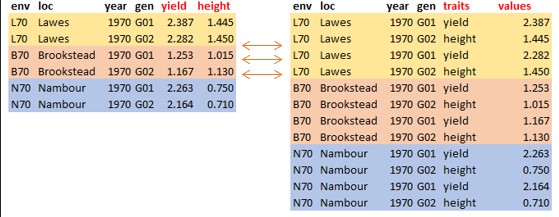
Data management is an important task during data analysis because most times, datasets do not come in the required shape for analysis and result presentation. Hence, the need for conversion of dataset tables from wide to long format, or vice versa. It is important to understand data frame intuition where variables are in columns, observations are in rows, and values are in the cell.

The pivot_wider() or pivot_longer() functions in R tidyverse package help reorganize or reshape data values into the needed layout.


Pivot Longer

A common problem is a dataset where some of the column names are not names of variables, but values of a variable. The function pivot_longer() transform the dataset in wide format to longer.

Below is the basic R syntax needed to transform data from a wide format to a long format:

#|eval = FALSE
#pivot_longer(data, cols, names_to = "xxx", values_to = "yyy") #<<
  • data: a data frame to pivot longer
  • cols: columns to pivot into long format
  • names_to: a character specifying the name of the selected columns to pivot
  • values_to: a character specifying the name of the cell values in the pivoted columns.

Example

To illustrate how this function works, let’s import the Australia Soybean 1970 dataset.

#|echo=TRUE
#|results="tiny"
#library(tidyverse) 
dat <- read_csv("australia.soybean1970.csv") 
Rows: 232 Columns: 7
── Column specification ────────────────────────────────────────────────────────
Delimiter: ","
chr (3): env, loc, gen
dbl (4): year, yield, height, lodging

ℹ Use `spec()` to retrieve the full column specification for this data.
ℹ Specify the column types or set `show_col_types = FALSE` to quiet this message.

We have a data frame with 7 variables (env, loc, year, gen, yield, height, and lodging) and 232 observations. The data frame is stored under an object named dat

#|echo=TRUE
#|results="tiny"
dat
# A tibble: 232 × 7
   env   loc    year gen   yield height lodging
   <chr> <chr> <dbl> <chr> <dbl>  <dbl>   <dbl>
 1 L70   Lawes  1970 G01    2.39  1.44     4.25
 2 L70   Lawes  1970 G02    2.28  1.45     4.25
 3 L70   Lawes  1970 G03    2.57  1.46     3.75
 4 L70   Lawes  1970 G04    2.88  1.26     3.5 
 5 L70   Lawes  1970 G05    2.39  1.34     3.5 
 6 L70   Lawes  1970 G06    2.41  1.36     4   
 7 L70   Lawes  1970 G07    2.70  1.3      3   
 8 L70   Lawes  1970 G08    2.46  0.955    3.25
 9 L70   Lawes  1970 G09    2.57  1.03     3   
10 L70   Lawes  1970 G10    2.98  1.16     3.75
# ℹ 222 more rows

As you can see, the dataset is already in wide format as seen from the previous slide. To transform the dataset into a long format, we use the function pivot_longer

#|echo=TRUE
#|tidy=FALSE
dat_longer <- dat |>   pivot_longer(yield:lodging, names_to = "trait", values_to = "values") 
#|echo=TRUE
#|results="tiny"
dat_longer
# A tibble: 696 × 6
   env   loc    year gen   trait   values
   <chr> <chr> <dbl> <chr> <chr>    <dbl>
 1 L70   Lawes  1970 G01   yield     2.39
 2 L70   Lawes  1970 G01   height    1.44
 3 L70   Lawes  1970 G01   lodging   4.25
 4 L70   Lawes  1970 G02   yield     2.28
 5 L70   Lawes  1970 G02   height    1.45
 6 L70   Lawes  1970 G02   lodging   4.25
 7 L70   Lawes  1970 G03   yield     2.57
 8 L70   Lawes  1970 G03   height    1.46
 9 L70   Lawes  1970 G03   lodging   3.75
10 L70   Lawes  1970 G04   yield     2.88
# ℹ 686 more rows

Pivot Wider

The function pivot_wider() is the opposite of the pivot_longer() function. It transforms the dataset from long format to wider. Below is the basic R syntax needed to transform data from a wide format to a long format:

#|echo=TRUE
#pivot_wider(data, names_from = "xxx", values_from = "yyy") #<<
  • data: a data frame to pivot wider
  • names_from: the name of the output column
  • values_from: the name of the column to get the cell values from

Example

To transform the dataset into a wide format, we use the function pivot_wider()

#|echo=TRUE
#|results="tiny"
library(tidyverse) 
dat <- read_csv("Longer.csv") 
Rows: 696 Columns: 6
── Column specification ────────────────────────────────────────────────────────
Delimiter: ","
chr (4): env, loc, gen, trait
dbl (2): year, values

ℹ Use `spec()` to retrieve the full column specification for this data.
ℹ Specify the column types or set `show_col_types = FALSE` to quiet this message.
#|echo=TRUE
#|results="tiny"
dat
# A tibble: 696 × 6
   env   loc    year gen   trait   values
   <chr> <chr> <dbl> <chr> <chr>    <dbl>
 1 L70   Lawes  1970 G01   yield     2.39
 2 L70   Lawes  1970 G01   height    1.44
 3 L70   Lawes  1970 G01   lodging   4.25
 4 L70   Lawes  1970 G02   yield     2.28
 5 L70   Lawes  1970 G02   height    1.45
 6 L70   Lawes  1970 G02   lodging   4.25
 7 L70   Lawes  1970 G03   yield     2.57
 8 L70   Lawes  1970 G03   height    1.46
 9 L70   Lawes  1970 G03   lodging   3.75
10 L70   Lawes  1970 G04   yield     2.88
# ℹ 686 more rows
#|echo=TRUE
#|tidy=FALSE
dat_wider <- dat |>   pivot_wider(names_from = "trait", values_from = "values")
#|echo=TRUE
#|results="tiny"
dat_wider
# A tibble: 232 × 7
   env   loc    year gen   yield height lodging
   <chr> <chr> <dbl> <chr> <dbl>  <dbl>   <dbl>
 1 L70   Lawes  1970 G01    2.39  1.44     4.25
 2 L70   Lawes  1970 G02    2.28  1.45     4.25
 3 L70   Lawes  1970 G03    2.57  1.46     3.75
 4 L70   Lawes  1970 G04    2.88  1.26     3.5 
 5 L70   Lawes  1970 G05    2.39  1.34     3.5 
 6 L70   Lawes  1970 G06    2.41  1.36     4   
 7 L70   Lawes  1970 G07    2.70  1.3      3   
 8 L70   Lawes  1970 G08    2.46  0.955    3.25
 9 L70   Lawes  1970 G09    2.57  1.03     3   
10 L70   Lawes  1970 G10    2.98  1.16     3.75
# ℹ 222 more rows

Combining Tables

So far we have seen how tidy data can be reshaped. However, there are occasions when dataset comes from different data sources and we need to combine them together before we proceed further to analysis or result presentation. The dplyr in R tidyverse package offers different mutating join functions to combine datasets together. A mutating join function allows you to combine variables from two tables by matching observations by key variable(s), then copy variables from one table to another.

There are four common mutating joins: left_join, right_join, inner_join, and full_join. They all have the same arguments but return different tables, df1 and df2 are a pair of data frames to join, and by is a unique character vector variable(s) to join the data frames by.

Left Join

left_join(df1, df2, by)

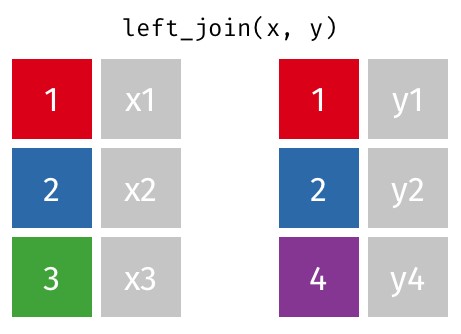
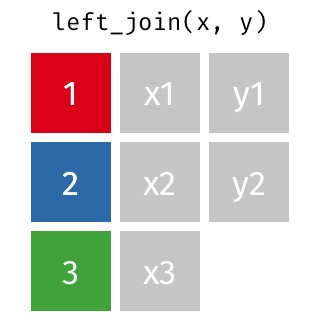
A left join in R is a kind of database join that joins two data frames together by their columns using a shared key. Only the matching rows from the right data frame are included in the result of a left join, which contains all of the rows from the left data frame. NA values are entered for each column in the corresponding data frame if there is no match.

Example

To demonstrate how these mutating joins work, let’s import the pair of data frames needed.

#|echo=TRUE

library(readxl) 
dat1 <- read_excel("df.combine.xlsx", sheet="df1") 
dat2 <- read_excel("df.combine.xlsx", sheet="df2")

dat1 has 15 observations with five variables:gen, yield, height, size, and protein.

dat2 has 15 observations with two variables:gen, oil.

Display the observations in dat1

#|echo=TRUE
#|results="tiny"
dat1
# A tibble: 15 × 5
   gen   yield height  size protein
   <chr> <dbl>  <dbl> <dbl>   <dbl>
 1 G01    2.79  0.97   8.35    39.4
 2 G02    2.62  0.785  9.75    40.6
 3 G03    2.48  0.955 11.4     37.4
 4 G04    2.92  0.76  11.1     36.9
 5 G05    2.14  0.76  11.9     38.7
 6 G06    2.86  0.65  12.2     38.1
 7 G07    2.97  0.8   11.2     37.4
 8 G08    1.65  0.9   11.8     36.6
 9 G09    3.1   0.825 12.2     37.1
10 G10    3.00  0.785 12.0     37.8
11 G11    1.90  0.875  7.4     43.4
12 G12    1.64  1.16   7.45    44.4
13 G13    1.97  1.08   8.25    42.2
14 G14    2.45  0.865  7.65    38.4
15 G15    2.63  0.675  9.05    40.7

Display the observations in dat2

#|echo=TRUE
#|results="tiny"
dat2
# A tibble: 15 × 5
   gen   yield height  size   oil
   <chr> <dbl>  <dbl> <dbl> <dbl>
 1 G01    2.39  1.44   8.45  20.9
 2 G02    2.28  1.45   9.95  20.7
 3 G03    2.57  1.46  10.8   21.3
 4 G04    2.88  1.26  10.0   22.0
 5 G05    2.39  1.34  11     22.1
 6 G06    2.41  1.36  11.8   21.2
 7 G07    2.70  1.3   11.8   21.7
 8 G08    2.46  0.955 10     21.1
 9 G09    2.57  1.03  11.2   21.5
10 G10    2.98  1.16  10.8   20.4
11 G16    1.66  1.42   6.95  19.1
12 G17    1.96  1.44   8.35  18.7
13 G18    1.47  1.58   9.3   19.2
14 G19    2.72  1.33   8.25  20.8
15 G20    2.22  1.37   9.3   20.7
#|echo=TRUE
#|results="tiny"
# Left join 
df_left <- left_join(dat1, dat2)   
Joining with `by = join_by(gen, yield, height, size)`
df_left
# A tibble: 15 × 6
   gen   yield height  size protein   oil
   <chr> <dbl>  <dbl> <dbl>   <dbl> <dbl>
 1 G01    2.79  0.97   8.35    39.4    NA
 2 G02    2.62  0.785  9.75    40.6    NA
 3 G03    2.48  0.955 11.4     37.4    NA
 4 G04    2.92  0.76  11.1     36.9    NA
 5 G05    2.14  0.76  11.9     38.7    NA
 6 G06    2.86  0.65  12.2     38.1    NA
 7 G07    2.97  0.8   11.2     37.4    NA
 8 G08    1.65  0.9   11.8     36.6    NA
 9 G09    3.1   0.825 12.2     37.1    NA
10 G10    3.00  0.785 12.0     37.8    NA
11 G11    1.90  0.875  7.4     43.4    NA
12 G12    1.64  1.16   7.45    44.4    NA
13 G13    1.97  1.08   8.25    42.2    NA
14 G14    2.45  0.865  7.65    38.4    NA
15 G15    2.63  0.675  9.05    40.7    NA
  • The code performs a left join on dat1 and dat2, resulting in a new data frame df_left that contains all rows from the left data frame (dat1) along with matching rows from dat2. Rows in dat1 without a corresponding match in dat2 will have NA in their resulting columns for data from dat2.

Right Join

right_join(df1, df2, by)

#join matching values from df2 to df1 

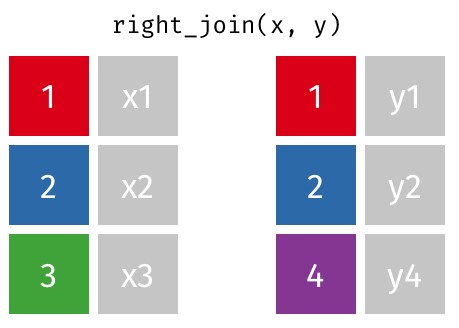
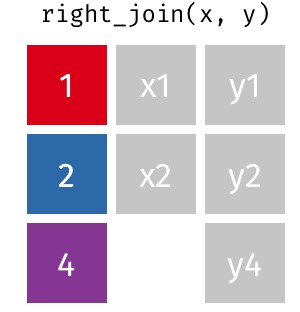
A right join is a type of database join that combines two data frames based on a common key, similar to a left join but with a focus on retaining all the rows from the right data frame. When performing a right join, all rows from the right data frame are included in the result, and only the matching rows from the left data frame are included. If there is no match, the corresponding columns of the left data frame will be filled with NA values

Example

Continuing with the previous data,

#|echo=TRUE
#|results="tiny"
# Right join 
df_right <- right_join(dat1, dat2)   
Joining with `by = join_by(gen, yield, height, size)`
df_right
# A tibble: 15 × 6
   gen   yield height  size protein   oil
   <chr> <dbl>  <dbl> <dbl>   <dbl> <dbl>
 1 G01    2.39  1.44   8.45      NA  20.9
 2 G02    2.28  1.45   9.95      NA  20.7
 3 G03    2.57  1.46  10.8       NA  21.3
 4 G04    2.88  1.26  10.0       NA  22.0
 5 G05    2.39  1.34  11         NA  22.1
 6 G06    2.41  1.36  11.8       NA  21.2
 7 G07    2.70  1.3   11.8       NA  21.7
 8 G08    2.46  0.955 10         NA  21.1
 9 G09    2.57  1.03  11.2       NA  21.5
10 G10    2.98  1.16  10.8       NA  20.4
11 G16    1.66  1.42   6.95      NA  19.1
12 G17    1.96  1.44   8.35      NA  18.7
13 G18    1.47  1.58   9.3       NA  19.2
14 G19    2.72  1.33   8.25      NA  20.8
15 G20    2.22  1.37   9.3       NA  20.7

The right join operation retains all rows from the right data frame (dat2) and only those rows from the left data frame (dat1) that match based on the specified keys. If there are entries in dat2 without corresponding matches in dat1, the output will show NA in place of those unmatched entries from dat1

Inner Join

inner_join(df1, df2, by)

#join values from df2 to df1 and retain only matching rows

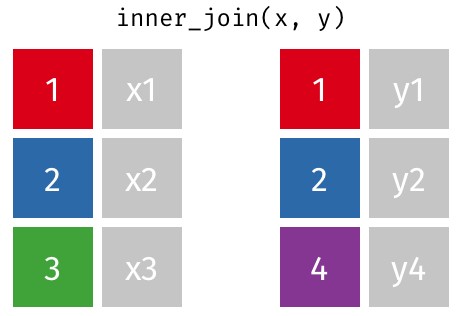
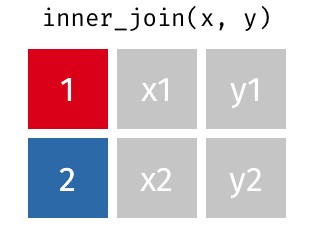
An inner join is a type of database join that combines two data frames (or tables) based on a common key or keys, returning only those rows where there is a match in both data frames. In other words, an inner join retrieves the intersection of the two dataset

Example

#|echo=TRUE
#|results="tiny"
# Inner join 
df_inner <- inner_join(dat1, dat2)   
Joining with `by = join_by(gen, yield, height, size)`
df_inner
# A tibble: 0 × 6
# ℹ 6 variables: gen <chr>, yield <dbl>, height <dbl>, size <dbl>,
#   protein <dbl>, oil <dbl>

The resulting data frame (df_inner) contains only those rows where there are matching values in the id column of both dat1 and dat2

Full join

full_join(df1, df2, by)

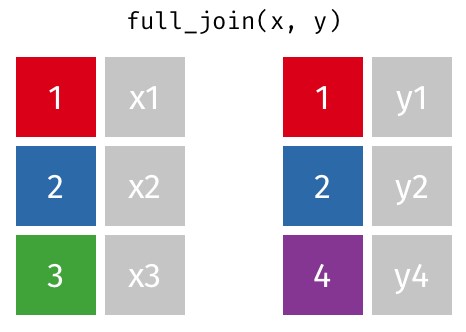
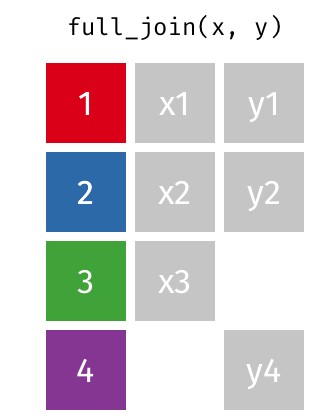
A full join (or full outer join) is a type of database join that combines the results of both left and right joins. This means that a full join returns all the rows from both data frames (or tables), regardless of whether there is a match between them. If a row in one data frame does not have a corresponding match in the other, the result will contain NA (or missing values) for the columns of the unmatched row from the other data frame.

Example

#|echo=TRUE
#|results="tiny"
# Full join 
df_full <- full_join(dat1, dat2)   
Joining with `by = join_by(gen, yield, height, size)`
df_full
# A tibble: 30 × 6
   gen   yield height  size protein   oil
   <chr> <dbl>  <dbl> <dbl>   <dbl> <dbl>
 1 G01    2.79  0.97   8.35    39.4    NA
 2 G02    2.62  0.785  9.75    40.6    NA
 3 G03    2.48  0.955 11.4     37.4    NA
 4 G04    2.92  0.76  11.1     36.9    NA
 5 G05    2.14  0.76  11.9     38.7    NA
 6 G06    2.86  0.65  12.2     38.1    NA
 7 G07    2.97  0.8   11.2     37.4    NA
 8 G08    1.65  0.9   11.8     36.6    NA
 9 G09    3.1   0.825 12.2     37.1    NA
10 G10    3.00  0.785 12.0     37.8    NA
# ℹ 20 more rows

The code df_full <- full_join(dat1, dat2) effectively creates a new data frame that combines data from dat1 and dat2, ensuring that all records are retained, either matched or unmatched. This type of join is particularly useful in exploratory data analysis and situations where preserving all relevant data is critical for further analysis and interpretation.

Creating Groups

Data wrangling in R sometimes requires modification or creating a new variable based on certain possible conditions during data analysis.

It is possible to create new variables with the mutate() function in the tidyverse package.

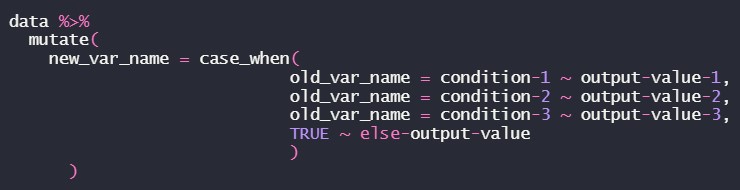
The case_when() function allows you to vectorize multiple if_else statements, i.e. you test condition-1, and then output output-value-1 if the condition-1 is true, then test condition-2, and output output-value-2 if condition-2 is true, the logical statements continue until you specify a value to output if none of the conditions were true.

However, if we are interested in creating a new variable within a dataframe based on certain conditions with some if-elif-else style logic, then the case_when() function is used with the mutate() function, both are in the tidyverse package.

To illustrate the description in the previous slide, let’s consider the image below

The TRUE~ is equivalent to the ‘else’ in the ‘if-else’ statement.

It is important to note that the conditions are evaluated in order, therefore one must proceed from the most specific to the most general condition.

Let’s demonstrate how case_when works with these examples using the Australia Soybean 1970 dataset.

We are going to create four lodging categories such as >=1 = ‘No Lodging’, >=1.5 = ‘Mild Lodging’, >=2.5 = ‘Moderate Lodging’, and >=3.5 = ‘Heavy Lodging’.

#|echo=TRUE

dat <- read_csv("australia.soybean1970.csv") 
Rows: 232 Columns: 7
── Column specification ────────────────────────────────────────────────────────
Delimiter: ","
chr (3): env, loc, gen
dbl (4): year, yield, height, lodging

ℹ Use `spec()` to retrieve the full column specification for this data.
ℹ Specify the column types or set `show_col_types = FALSE` to quiet this message.
dat
# A tibble: 232 × 7
   env   loc    year gen   yield height lodging
   <chr> <chr> <dbl> <chr> <dbl>  <dbl>   <dbl>
 1 L70   Lawes  1970 G01    2.39  1.44     4.25
 2 L70   Lawes  1970 G02    2.28  1.45     4.25
 3 L70   Lawes  1970 G03    2.57  1.46     3.75
 4 L70   Lawes  1970 G04    2.88  1.26     3.5 
 5 L70   Lawes  1970 G05    2.39  1.34     3.5 
 6 L70   Lawes  1970 G06    2.41  1.36     4   
 7 L70   Lawes  1970 G07    2.70  1.3      3   
 8 L70   Lawes  1970 G08    2.46  0.955    3.25
 9 L70   Lawes  1970 G09    2.57  1.03     3   
10 L70   Lawes  1970 G10    2.98  1.16     3.75
# ℹ 222 more rows
#|echo=TRUE
#|tidy=FALSE

dat_new <- dat |>           mutate(                     lodging_grp = case_when(                                       lodging >= 3.5 ~ "Heavy Lodging",                                          lodging >= 2.5 ~ "Moderate Lodging",                                          lodging >= 1.5 ~ "Mild Lodging",                                          lodging >= 1 ~ "No Lodging",                                                     TRUE ~ "NA")              ) 
#|echo=TRUE
#|results="tiny"
dat_new 
# A tibble: 232 × 8
   env   loc    year gen   yield height lodging lodging_grp     
   <chr> <chr> <dbl> <chr> <dbl>  <dbl>   <dbl> <chr>           
 1 L70   Lawes  1970 G01    2.39  1.44     4.25 Heavy Lodging   
 2 L70   Lawes  1970 G02    2.28  1.45     4.25 Heavy Lodging   
 3 L70   Lawes  1970 G03    2.57  1.46     3.75 Heavy Lodging   
 4 L70   Lawes  1970 G04    2.88  1.26     3.5  Heavy Lodging   
 5 L70   Lawes  1970 G05    2.39  1.34     3.5  Heavy Lodging   
 6 L70   Lawes  1970 G06    2.41  1.36     4    Heavy Lodging   
 7 L70   Lawes  1970 G07    2.70  1.3      3    Moderate Lodging
 8 L70   Lawes  1970 G08    2.46  0.955    3.25 Moderate Lodging
 9 L70   Lawes  1970 G09    2.57  1.03     3    Moderate Lodging
10 L70   Lawes  1970 G10    2.98  1.16     3.75 Heavy Lodging   
# ℹ 222 more rows

Also, we may be interested in creating a new variable from the existing categorical variable.

Let’s use the new data set dat_new to demonstrate this process using mutate and case_when functions and introduce the IN operator %in% i.e. We create two lodging categories such that 'No Lodging' and 'Mild Lodging' will be "No Lodging", and 'Moderate Lodging' and 'Heavy Lodging' will be "Lodging".

#|echo=TRUE
#|tidy=FALSE
dat_new <- dat_new |>           mutate(           lodging_grp2 = case_when(           lodging_grp %in% c("Heavy Lodging","Moderate Lodging")  ~ "Lodging",           lodging_grp %in% c("No Lodging", "Mild Lodging") ~ "No Lodging",                                                     TRUE   ~ "NA")        )
#|echo=TRUE
#|results="tiny"
dat_new 
# A tibble: 232 × 9
   env   loc    year gen   yield height lodging lodging_grp      lodging_grp2
   <chr> <chr> <dbl> <chr> <dbl>  <dbl>   <dbl> <chr>            <chr>       
 1 L70   Lawes  1970 G01    2.39  1.44     4.25 Heavy Lodging    Lodging     
 2 L70   Lawes  1970 G02    2.28  1.45     4.25 Heavy Lodging    Lodging     
 3 L70   Lawes  1970 G03    2.57  1.46     3.75 Heavy Lodging    Lodging     
 4 L70   Lawes  1970 G04    2.88  1.26     3.5  Heavy Lodging    Lodging     
 5 L70   Lawes  1970 G05    2.39  1.34     3.5  Heavy Lodging    Lodging     
 6 L70   Lawes  1970 G06    2.41  1.36     4    Heavy Lodging    Lodging     
 7 L70   Lawes  1970 G07    2.70  1.3      3    Moderate Lodging Lodging     
 8 L70   Lawes  1970 G08    2.46  0.955    3.25 Moderate Lodging Lodging     
 9 L70   Lawes  1970 G09    2.57  1.03     3    Moderate Lodging Lodging     
10 L70   Lawes  1970 G10    2.98  1.16     3.75 Heavy Lodging    Lodging     
# ℹ 222 more rows

Strings

As we all know that data comes in different formats, numeric or non-numeric (text/string) data format. Data wrangling of non-numeric data sometimes requires splitting of the cell into multiple individual cells or combining multiple cells into a single cell before analysis.

There are some functions in the tidyverse package used for this purpose such as unite(), separate(), and str_sub().

  • unite(): collapse cells across several columns into a single column.

  • separate(): separate each cell in a column into several columns.

  • str_sub(): extract a substring from a character vector.

Let’s use a fictitious data set called BadData to demonstrate how these functions work.

The data set has seven (7) variables: Gen: A combination of location, genotype, and replication, Year: Year of trials, Traits: Measured traits (Trait1 – Trait5)

#|echo=TRUE
#|results="tiny"
dat <- read_csv("BadData.csv") 
Rows: 360 Columns: 7
── Column specification ────────────────────────────────────────────────────────
Delimiter: ","
chr (1): Gen
dbl (6): Year, Trait1, Trait2, Trait3, Trait4, Trait5

ℹ Use `spec()` to retrieve the full column specification for this data.
ℹ Specify the column types or set `show_col_types = FALSE` to quiet this message.
dat
# A tibble: 360 × 7
   Gen       Year Trait1 Trait2 Trait3 Trait4 Trait5
   <chr>    <dbl>  <dbl>  <dbl>  <dbl>  <dbl>  <dbl>
 1 IBG10-1   2020     12     12     58     63     85
 2 IBG10-2   2020      9      9     62     67     96
 3 IBG10-3   2020     12     12     56     63     96
 4 IBG11-1   2020     10     10     56     60     95
 5 IBG11-2   2020      9      9     56     60    102
 6 IBG11-3   2020     10     10     57     60     97
 7 IBG12-1   2020     10     10     50     59     84
 8 IBG12-2   2020     11     11     53     56     84
 9 IBG12-3   2020     12     12     57     60     92
10 IBG126-1  2020     11     10     51     58     84
# ℹ 350 more rows

The first task will be to create separate variables for location, genotype, and replication from the Gen variable.

#|echo=TRUE
#|tidy=FALSE
dat1 <- dat |>    separate(Gen, sep = "-", into = c("LocGen", "Rep")) |>    mutate(           Location = str_sub(LocGen, 1, 2),           Gen = str_sub(LocGen, 3, 5)    ) |>    select(Location, Gen, Rep, Year, Trait1, Trait2, Trait3, Trait4, Trait5)
#|echo=TRUE
#|results="tiny"
dat1
# A tibble: 360 × 9
   Location Gen   Rep    Year Trait1 Trait2 Trait3 Trait4 Trait5
   <chr>    <chr> <chr> <dbl>  <dbl>  <dbl>  <dbl>  <dbl>  <dbl>
 1 IB       G10   1      2020     12     12     58     63     85
 2 IB       G10   2      2020      9      9     62     67     96
 3 IB       G10   3      2020     12     12     56     63     96
 4 IB       G11   1      2020     10     10     56     60     95
 5 IB       G11   2      2020      9      9     56     60    102
 6 IB       G11   3      2020     10     10     57     60     97
 7 IB       G12   1      2020     10     10     50     59     84
 8 IB       G12   2      2020     11     11     53     56     84
 9 IB       G12   3      2020     12     12     57     60     92
10 IB       G12   1      2020     11     10     51     58     84
# ℹ 350 more rows

Also, we may be interested in creating a new variable which will be a combination of at least two variables. Suppose we want to create a variable called environment (Env) using the data set above by combining the Location and Year together.

#|echo=TRUE
#|results="tiny"
dat1 <- dat1 |>          unite(Location, Year, col = "Env", sep = "-") 
dat1
# A tibble: 360 × 8
   Env     Gen   Rep   Trait1 Trait2 Trait3 Trait4 Trait5
   <chr>   <chr> <chr>  <dbl>  <dbl>  <dbl>  <dbl>  <dbl>
 1 IB-2020 G10   1         12     12     58     63     85
 2 IB-2020 G10   2          9      9     62     67     96
 3 IB-2020 G10   3         12     12     56     63     96
 4 IB-2020 G11   1         10     10     56     60     95
 5 IB-2020 G11   2          9      9     56     60    102
 6 IB-2020 G11   3         10     10     57     60     97
 7 IB-2020 G12   1         10     10     50     59     84
 8 IB-2020 G12   2         11     11     53     56     84
 9 IB-2020 G12   3         12     12     57     60     92
10 IB-2020 G12   1         11     10     51     58     84
# ℹ 350 more rows

Exercise

  1. Import Example-02.csv to R and save it to an object named example02 Display the example02 object filter the data by considering: locations Nambour and RedlandBay genotypes G01, G57, and G58, location Brookstead for the year 1970 location Lawes yield between 2 and 3 inclusive, oil greater than 22

  2. Import Example-02.csv to R and save to an object named example02 Create a new variable called ENV by combining the first three letters in loc and the last two digit in year. Categorize the yield values of at least 3 as "High" and other values as "Low" into a new variable called yield_grp. Select ENV, gen, yield, yield_grp, height, and oil and transform the dataset using appropriate variables as traits.